

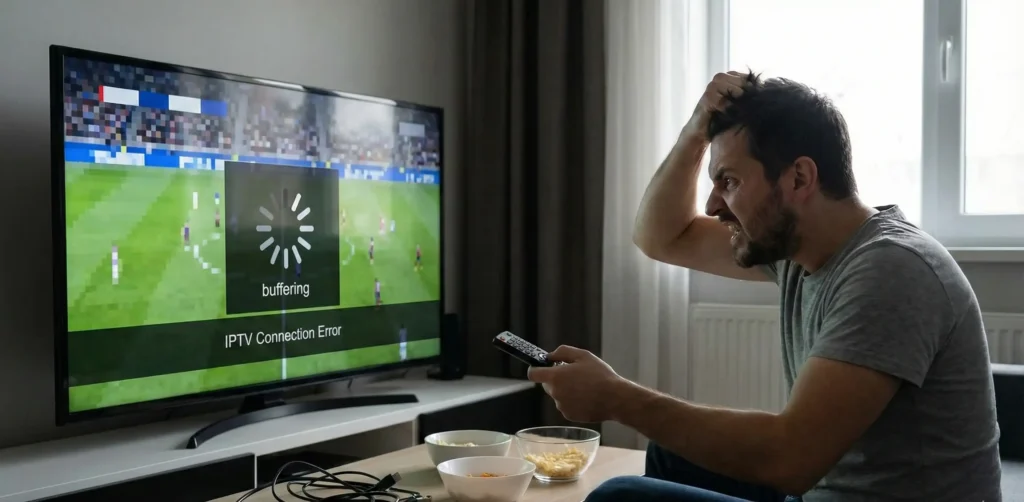

It’s 8:02 PM on a Saturday. The NRL Grand Final has just kicked off, you’ve got a beer in hand, and right as the first tackle is made… the screen freezes. The dreaded circle of death appears. Your stream has died.
You message your $10 IPTV guy on WhatsApp, but he ghosts you. You end up watching the highlights on Twitter an hour later.
If you are wondering exactly why does IPTV buffer during live sport, you aren’t alone. An NRL Grand Final stream buffer is the most common complaint in the entire industry. There are two highly specific reasons this keeps happening to you on game night, and thankfully, both are entirely fixable.
Reason 1: Your provider’s server is overloaded (and they knew it would be)
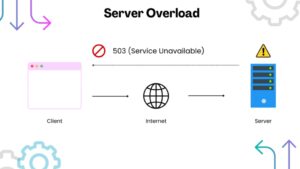
Let’s look under the hood of how cheap IPTV actually works. When you buy a subscription from a massive, faceless reseller, you aren’t getting a dedicated, private pipeline to the broadcast. You are getting a shared ticket to a single server located somewhere in Eastern Europe or Asia.
During the week, when you’re just watching a random movie on a Tuesday night, that server handles the traffic perfectly fine. But live sports operate completely differently.
Imagine a stadium with only one set of entrance doors. At 2:00 PM, people trickle in slowly. No problem. But at 7:55 PM, right before the main event, 50,000 people try to smash through those exact same doors at the exact same second. The system collapses.
This is exactly what happens to your stream. Cheap providers never cap their user load. Their entire business model is based on maximizing the number of subscribers on a single piece of hardware to maximize their revenue. These resellers know their server can only handle 10,000 concurrent connections, but they sell 50,000 subscriptions anyway. They are fully aware it will crash during the main event. Ultimately, they just don’t care because they already have your money.
The Fix: Load-Capped Architecture
When 50,000 Australians tune into the exact same high-bitrate 4K sports channel at the exact same time, the server runs out of bandwidth. It starts dropping packets of data. Your TV stops receiving the video feed, and you get the circle of death.
The only real IPTV server overload fix is utilizing a load-capped server architecture. Instead of cramming everyone onto one machine, a properly engineered setup explicitly limits the number of users per server node. When a node reaches its maximum safe capacity—leaving enough headroom for heavy sports feeds—it stops accepting new connections and routes traffic to a backup node. An uncapped server at 8 PM on a Saturday is a guaranteed crash. A capped server is a stable stream.
Reason 2: Your ISP is throttling your connection on purpose
If your provider’s server isn’t the problem, your internet provider is. This is the dirty secret of the streaming industry that cheap resellers refuse to talk about. When you complain about a freeze, they tell you to “restart your router” or blame your Wi-Fi connection. It isn’t your Wi-Fi. It is deliberate network interference.
In Australia, the telecommunications giants own the broadcasting rights to major sports. They don’t want you watching grey-market streams; they want you paying a fortune for Foxtel and Kayo. To enforce this, companies like Telstra, Optus, and TPG actively monitor your internet traffic using a technology called Deep Packet Inspection (DPI).
How Telstra and Optus Use DPI
DPI allows your internet provider to look at the type of data flowing into your house. They might not know exactly what game you are watching, but they can easily identify the signature of high-bandwidth, unverified video streaming traffic.
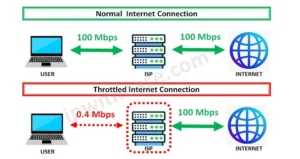
When they detect this traffic during a major broadcasting window—like Saturday night footy—they deliberately choke your connection. This practice is known as ISP throttling IPTV Australia. Your speed test might show you have a 100 Mbps NBN connection, but your ISP is artificially limiting your connection to that specific streaming server down to 2 Mbps. That is simply not enough data to sustain a live broadcast, resulting in constant, aggressive buffering.
Telstra blocking streaming traffic during peak hours is a documented reality. The telecom companies know exactly when the spikes happen, and they throttle the bandwidth accordingly to protect their own paid sports packages.
So, when your stream dies and your reseller tells you your internet is just slow, they are lying. Your internet is being weaponized against you. Fortunately, because this is an artificial block created by your ISP, you can completely bypass it if you know how to mask your traffic.
The fix: how to stop ISP throttling on match day (step-by-step)
You don’t have to put up with artificial throttling. Here is exactly how to force your internet provider to give you the bandwidth you pay for, ensuring your stream stays alive when it matters most.
Step 1: Mask your traffic with a VPN This is the single most critical step. A Virtual Private Network encrypts your internet traffic so your ISP cannot read it. If Telstra or Optus can’t see that you are streaming video, they can’t throttle it. Using the best VPN for IPTV Australia—like Surfshark or NordVPN—will completely bypass Deep Packet Inspection. Turn the VPN on, connect to an Australian server (like Sydney or Melbourne to keep speeds fast), and watch the buffering stop instantly.
Step 2: Change your DNS settings Your ISP uses their default Domain Name System (DNS) to route your traffic, which makes it easier for them to block known streaming URLs. Go into your device’s network settings and change your DNS to Cloudflare (Primary: 1.1.1.1, Secondary: 1.0.0.1) or Google (Primary: 8.8.8.8, Secondary: 8.8.4.4). This stops your ISP from hijacking your routing requests.
Step 3: Ditch the Wi-Fi for an Ethernet cable Live streaming requires a continuous, uninterrupted data packet flow. Wi-Fi is incredibly vulnerable to interference from walls, microwaves, and your neighbors’ routers. Hardwiring your TV or streaming box directly to your router with an ethernet cable eliminates local packet loss entirely.
Step 4: Optimize your hardware and resolution If you are running a heavy app natively on an old Smart TV, the internal processor will choke. Getting a dedicated device is the ultimate Firestick IPTV buffering fix. Furthermore, if the main event is heavily congested, manually drop your stream resolution from 4K to 1080p in your app settings. 1080p requires vastly less bandwidth and is far more likely to stay stable during a massive spike in global traffic.
Why these fixes only work if your provider’s servers can actually handle the load
Here is the harsh reality: you can have a hardwired ethernet connection, a top-tier VPN, and custom DNS settings, but none of it matters if the server on the other end is literally catching fire.
A VPN fixes your ISP throttling you. It does absolutely nothing to fix an overloaded, uncapped server. If you are connected to a reseller who just crammed 100,000 global users onto a single node, you are still going to buffer.
To completely eliminate buffering, you need a provider that engineers their infrastructure around local time zones. Streaming servers need to be optimized for Australian prime time (AEST).
When the Friday night footy kicks off, an AEST-optimized network automatically caps its user load and allocates maximum bandwidth to local sports channels. It doesn’t allow international traffic to overwhelm the hardware during a domestic main event. Fixing your home network is half the battle. Connecting to a server that actually respects capacity limits is the other.
What to look for in an IPTV provider before the next Grand Final
Before you hand over another $100 to a faceless reseller, you need to vet their infrastructure. Use this five-point checklist to guarantee you are buying a stable stream, not another weekend of frustration.
Do they cap server load during peak Australian hours? If they advertise “unlimited users,” run. You want a provider that explicitly manages and limits server capacity to ensure stability during major AEST events.
Do they have live human support? If the server routes poorly during a fight, a Telegram bot can’t help you. You need a provider who publishes a direct WhatsApp number and actually answers it during the main event.
Can they tell you their sports channel bitrates? Anyone can claim they offer HD. If they don’t know the difference between heavily compressed 720p and true uncompressed high-definition, you need to learn how to spot a fake 4K IPTV provider.
Are their servers Australian-routed? Pulling a heavy stream from a single server in Russia across undersea cables creates massive latency. Ensure your provider utilizes distributed nodes optimized for Oceania.
Do they educate you on network setups? A reliable provider will actively teach you how to set up a VPN and bypass your ISP. A bad provider will just tell you to turn your router off and on again.
If your stream is dying every Grand Final, the problem isn’t your TV, your Wi-Fi, or your router. It’s your provider. Australia4K runs Australian-optimised servers with strict load caps during peak AEST hours — and we’re on WhatsApp during the main event if anything goes wrong. Instant activation. Message us and we’ll have you streaming before kickoff.